ShowMe
Get in touch

Give your music
a screen.

ShowMe hears the song playing around you and brings its music video into sync. On your phone. On your TV. Through the sound system you love.

Brad Sucks performing Learning to Lie
Brad Sucks Learning to Lie
ShowMe
ShowMe recognizes Learning to Lie and reports synchronized playback

Actual app screen. Phone + TV presentation.

Android phone + Android TVA working prototype, still in development

Same music.
More atmosphere.

The music already has a place in your life. ShowMe gives it a place on your screen.

An evening worth staying for.

Friends over, music on, TV ready. Let the music videos follow the songs playing in the room, with automatic changes as the playlist moves on. You can spend the evening with your guests instead of searching for the next clip.

For house parties, gatherings and music-filled evenings.

Keep every detail
in the sound.

Your streamer, amplifier and speakers stay in charge of the music. ShowMe listens through the phone's microphone and adds the corresponding video on a separate screen. Enjoy your Hi-Fi or High-End system with something more to watch.

YOUR AUDIO SOURCEMusic stays here.
SHOWME + YOUR SCREENThe picture follows.

The phone hears
what you hear.

Like recognizing a song with Shazam, it starts with the sound in the room. There's no need for a direct connection to the device playing it.

  1. Hear the song

    The microphone picks up the music. Shazam identifies the track.

  2. Find its video

    ShowMe looks for a matching YouTube video. You can also choose one yourself.

  3. Bring it into sync

    The app compares the video with the music the phone hears and adjusts playback to follow it.

Recognition and synchronization depend on the recording and listening conditions. A live performance can differ too much from a studio track to synchronize accurately.

See it.
Hear it. Together.

Two real recordings of ShowMe in use. The music videos are used with permission from Brad Sucks and Lorenzo's Music.

A quick introduction

I explain the idea and show how the phone and TV follow the music playing in the room.

Open the recording in Google Drive

One song after another

A longer demonstration of automatic video changes and synchronization as different songs play.

Open the recording in Google Drive

If a recording won't play here, use its Google Drive link. Embedded videos contact Google only after you press play.

A closer look
at ShowMe.

These are actual screens from the development version. Here's what you're looking at.

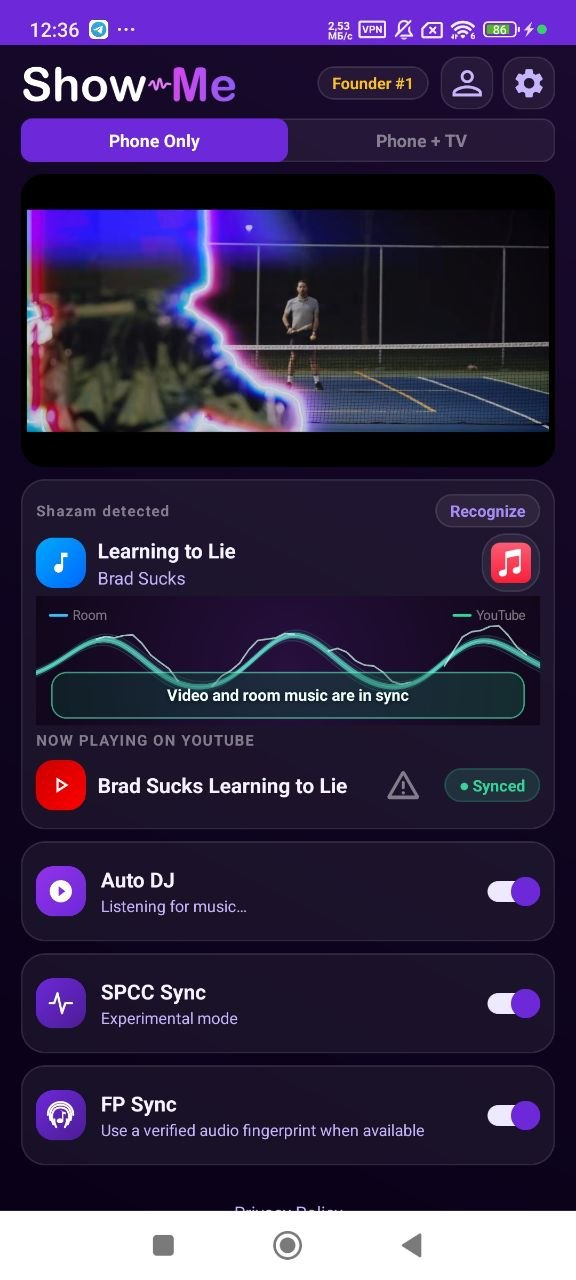
ShowMe main screen with recognized song and synchronization graph

Music and video aligned

Shazam has identified Learning to Lie by Brad Sucks. The graph compares room music with the video; the status shows that the app has found synchronization. Auto DJ keeps listening for song changes.

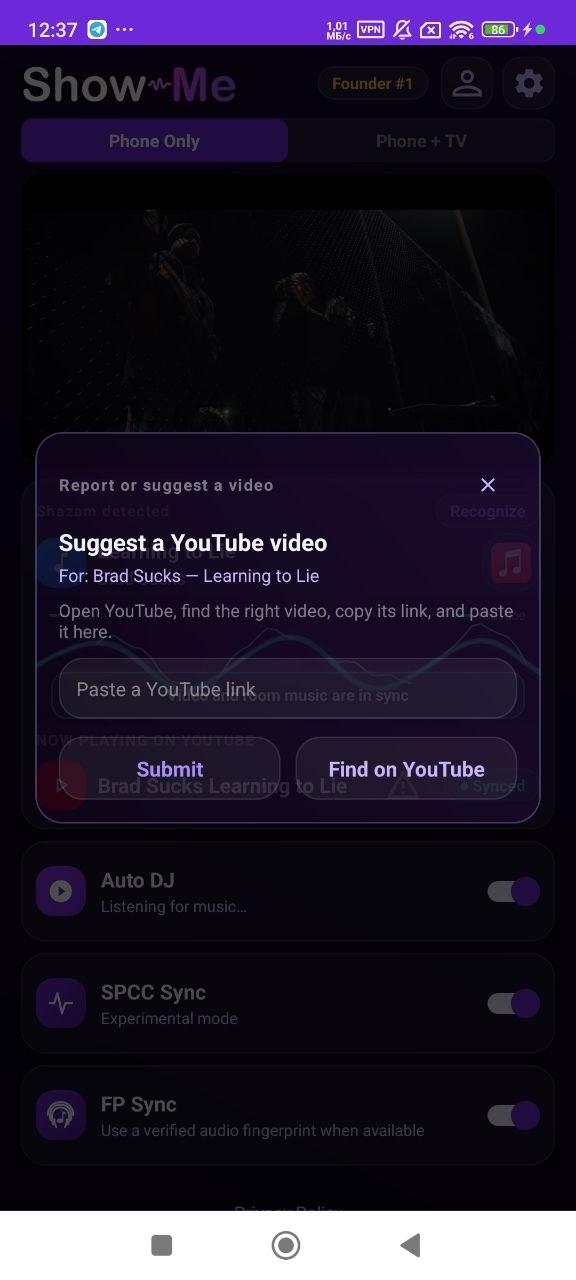
ShowMe screen for choosing a different video for a song

Your song. Your choice.

Automatic search doesn't always find the best version. Choose another YouTube video for the song and save your preference. A matching audio recording can also be synchronized.

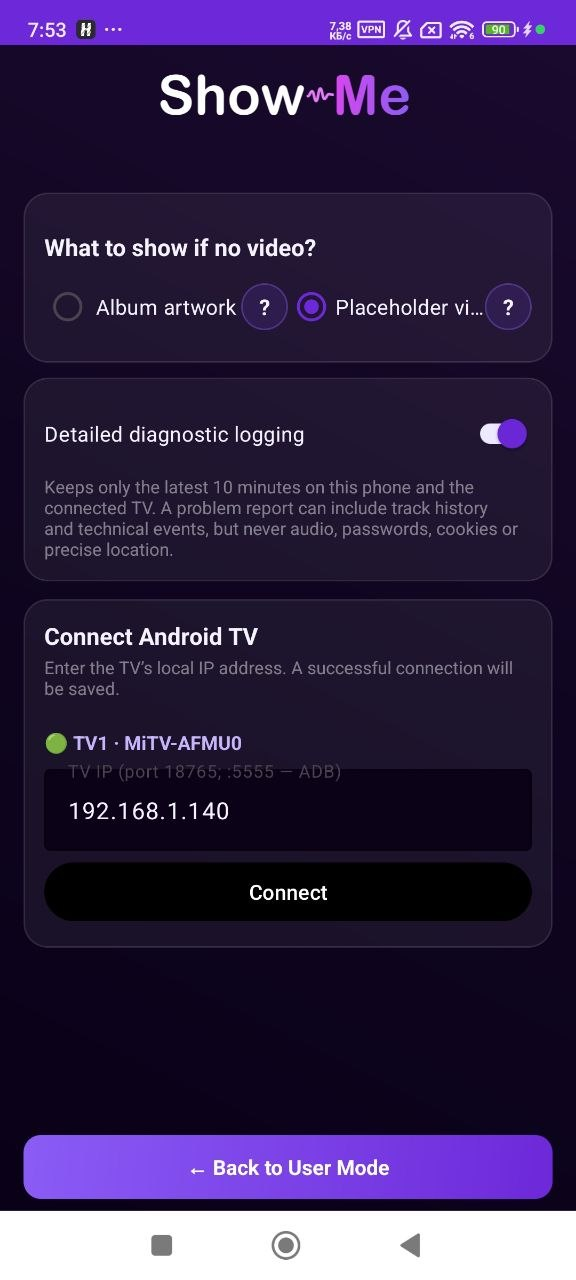
ShowMe settings for Android TV connection and display fallback

Make it fit your room

Connect an Android TV on your local network. Choose album artwork or background videos when a suitable music video isn't available.

A simple idea.
A year of building.

I wanted to listen to music on the system I already enjoyed and see the corresponding video on the TV. Without choosing every clip by hand.

Recognizing a song was only the beginning. The difficult part was making a separate video follow the exact moment in the music that the phone could hear, then keeping it there as playback continued and songs changed.

I spent the year trying different approaches, rewriting code and listening to clips again and again. ShowMe is now a working prototype, and I'm still improving it and exploring a path to a public release with video and streaming platforms.

Kirill Kazakov, creator of ShowMe

Let's give music
something to show.

Interested in the idea, have feedback, or work with music videos and streaming platforms? I'd like to hear from you.

Write to Kirill